A well-organized website helps visitors find information without confusion and gives search engines a clearer understanding of how pages relate to one another. When important information is difficult to locate, even useful content may fail to deliver its full value. This is why website information architecture is an essential consideration when planning a website, publishing new pages, or improving an existing online presence. A strong structure also works alongside technical SEO improvements to support discoverability, usability, and long-term website maintenance.
It is not simply about creating menus or arranging pages into categories. It involves deciding what information belongs on the website, how it should be grouped, which pages should be prioritized, and how visitors can move naturally from one section to another.
By approaching website structure strategically, businesses can create more useful digital experiences while making their content easier to manage as the website grows.
What Is Website Information Architecture?
It is the process of organizing, labeling, and connecting information so that people can understand a website and find what they need.
It includes several important elements:
- Page hierarchy: How main pages, categories, subcategories, and individual resources are organized.
- Navigation: How visitors move between different sections of the website.
- Content grouping: How related information is arranged into meaningful categories.
- Internal links: How pages connect to other relevant pages.
- Page labels: How menus, headings, and links communicate what visitors can expect.
- URL structure: How website addresses reflect content organization.
These elements work together to create a website that is easier to navigate and maintain.
For example, an online store might organize its pages into product categories, individual products, customer support resources, and purchasing information. A professional services website might use a different structure, with separate sections for services, industry insights, company information, and inquiries.
The right structure depends on the website’s purpose, audience, and content requirements.
Why Website Structure Matters for SEO
Search engine optimization involves more than individual keywords and page content. Search engines also need to discover pages, understand their relationships, and determine which resources are relevant to particular queries.
A logical website structure can support these processes in several ways.
1. It Helps Search Engines Discover Important Pages
Search engines use links to discover URLs and explore relationships between pages. If an important article is isolated from the rest of a website, it may be harder for visitors and crawlers to find through normal navigation.
A clear hierarchy and useful internal links provide pathways to important resources.
For example, a main service page can link to supporting guides that explain related topics. Those guides can then link back to the service page where appropriate. This creates a connected structure rather than a collection of disconnected URLs.
A sitemap can provide additional information about a website’s URLs, but it should complement good navigation and linking rather than replace them.
2. It Clarifies the Relationship Between Topics
When related pages are grouped logically, visitors can understand how different subjects connect.
Consider a website that publishes articles about online marketing. Its content might cover SEO, website usability, content planning, analytics, and paid advertising. Organizing these topics into meaningful sections makes the site easier to explore.
Contextual links between related pages can reinforce these relationships. However, pages should only be connected when the destination offers genuinely useful additional information.
3. It Improves User Experience
Visitors often arrive on a website through a blog article, product page, or search result rather than the homepage. They need a clear way to understand where they are and what they can do next.
Useful navigation, descriptive labels, breadcrumbs, and links to related content reduce unnecessary effort.
A visitor reading an educational article, for instance, might want to explore a detailed guide, compare relevant services, or locate a contact page. A well-organized website provides these pathways without forcing visitors to repeatedly return to the homepage.
4. It Supports Website Growth
A website may begin with a few pages and gradually expand to include new services, products, resources, and articles.
Without a clear structure, adding more pages can create duplicate categories, confusing navigation, and difficult-to-maintain content.
Planning the architecture early makes it easier to accommodate future growth while preserving a consistent experience.
The Main Elements of an Effective Website Architecture
A useful website structure combines hierarchy, navigation, content relationships, and consistent page organization.
1. A Clear Page Hierarchy
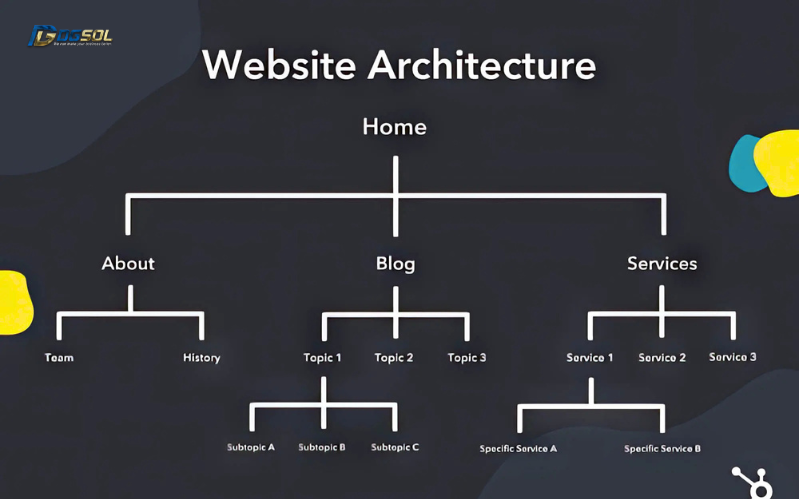
Page hierarchy describes how information is arranged from broad topics to more specific resources.
A typical structure might look like this:
- Homepage
- Main category
- Subcategory
- Individual page or article
- Subcategory
- Main category
This is only an example. Smaller websites may not need several levels, while larger websites may require more detailed organization.
The important principle is that each page should have a clear purpose and a logical place within the overall structure.
Avoid creating unnecessary levels that make visitors click through multiple unrelated pages before reaching the information they need.
2. Descriptive Navigation Menus
Navigation labels should communicate the content or function of each section.
Labels such as “Services,” “Resources,” “Products,” and “Contact” can be effective when they accurately describe the destination. Vague labels may leave visitors uncertain about what they will find.
Keep the main navigation focused on the sections that matter most to the audience. Less frequently used resources can be placed in suitable secondary menus or the footer.
For mobile visitors, ensure that menus are easy to open, read, and use. Navigation should remain understandable on smaller screens without overwhelming the page.
3. Logical URL Organization
A URL should be understandable and consistent with the page’s purpose.
For example, a website might use addresses such as:
- example.com/services/
- example.com/resources/
- example.com/resources/website-usability/
These examples communicate a general relationship between sections and pages.
A good URL structure usually follows a few practical principles:
- Use short, descriptive addresses.
- Separate words with hyphens.
- Keep URL patterns consistent.
- Avoid unnecessary parameters and confusing strings where possible.
- Avoid changing established URLs without a clear reason.
A descriptive URL can help people recognize a page before visiting it. However, changing URLs solely to make them shorter is rarely worthwhile if the existing addresses work correctly and are already established.
When URL changes are necessary, plan appropriate redirects and update internal links to avoid broken navigation.
4. Contextual Internal Linking
Internal links connect one page to another within the same website. They help visitors discover relevant information and give search engines additional context about relationships between pages.
Effective internal linking is intentional rather than random.
For example, an article explaining website usability might link to a relevant design resource. A guide about content planning might connect to a more detailed writing guide. Each link should help readers understand the subject more fully.
Use descriptive anchor text instead of relying exclusively on generic phrases such as “click here.” The anchor should explain what the linked page offers.
Avoid adding excessive links to every paragraph or repeatedly using the same exact-match keyword as anchor text. Relevance and usefulness should determine whether a link belongs in the content.
5. Breadcrumb Navigation
Breadcrumbs show visitors where a page sits within a website’s hierarchy.
A breadcrumb trail might look like this:
Home → Resources → Website Usability → Navigation Best Practices
This helps visitors understand the page’s context and return to a broader section without having to start over.
Breadcrumbs can be particularly useful for websites with many categories, products, or educational resources. Their implementation should reflect the actual page hierarchy rather than an arbitrary list of links.
How to Plan Website Information Architecture Step by Step
A structured planning process helps prevent unnecessary pages, confusing categories, and avoidable navigation problems.
Step 1: Define the Website’s Main Goals
Start by identifying what the website needs to accomplish.
A business website might aim to generate inquiries, explain services, demonstrate expertise, or sell products. An educational website may prioritize resource discovery and topic exploration.
These goals influence which pages should receive the most attention and how visitors should move through the site.
Without clear goals, it is easy to build navigation around internal business preferences rather than the audience’s needs.
Step 2: Understand Your Audience
Consider who will use the website and what they are likely to look for.
Potential questions include:
- What problems are visitors trying to solve?
- Which information do they need first?
- What questions are likely to arise before they make a decision?
- Which pages should be easy to access from any section?
- What terms will visitors understand when reading menu labels?
Audience research, customer inquiries, website analytics, and search queries can all provide useful clues.
The objective is to make the website understandable to its intended users, including those unfamiliar with the business or its terminology.
Step 3: Audit Existing Pages
Before creating a new structure, review the pages that already exist.
Record each URL, its main purpose, its topic, and its relationship to other pages. Identify outdated information, duplicate pages, broken links, and resources that are difficult to locate.
An audit may reveal that several articles cover nearly identical subjects or that an important service page receives very few relevant internal links.
Do not automatically delete pages that appear weak. Review their traffic, purpose, backlinks, and usefulness first. Some pages may need updating, merging, redirecting, or simply better navigation.
Step 4: Group Related Content
Once the existing pages are understood, arrange them into meaningful categories.
A content grouping exercise can begin with a simple spreadsheet or a visual diagram. Place pages addressing similar needs together and identify which subjects deserve a central overview page.
For example, a website covering online business growth might group resources into:
- Website design and usability
- Search engine optimization
- Content planning
- Digital advertising
- Measurement and reporting
These are illustrative categories, not a universal template. The final structure should reflect the site’s actual content and audience.
Avoid creating a separate category for every minor subject. Too many categories can make the website harder to navigate rather than easier.
Step 5: Identify Main Pages and Supporting Resources
Some pages provide an overview of a major subject, while others answer specific questions within that subject.
A central guide about website usability, for example, might link to supporting articles about navigation, forms, accessibility, and mobile layouts.
This approach creates a topic cluster in which related content supports a broader subject.
Supporting pages should contribute distinct value. If two articles serve nearly identical purposes, consider consolidating them instead of maintaining unnecessary duplication.
Step 6: Build a Visual Sitemap
A visual sitemap represents the planned relationships between pages.
It does not need to be complicated. A diagram, spreadsheet, or planning tool can show the homepage, major sections, subcategories, and individual resources.
Review the sitemap to check whether:
- Important pages are easy to locate.
- Categories are clearly differentiated.
- Similar content is grouped logically.
- Navigation paths make sense.
- The structure can accommodate future content.
A visual representation often reveals problems that are less obvious when reviewing a long list of URLs.
Step 7: Test the Structure With Real Users
Before finalizing a major redesign, test whether people can find important information.
Give participants simple tasks, such as locating a service, finding a pricing page, or identifying a resource about a particular topic. Observe where they hesitate or choose an unexpected menu item.
Even informal usability testing can reveal confusing labels and missing navigation pathways.
After testing, refine the structure rather than assuming the original plan is correct.
Common Website Architecture Mistakes to Avoid
Several structural problems can make a website harder to navigate, maintain, and optimize.
Creating Too Many Navigation Categories
A large menu with numerous unrelated choices can overwhelm visitors.
Group related pages under clear headings and prioritize the sections that matter most. Secondary links can be provided through contextual navigation, relevant category pages, or the footer.
The goal is not to minimize every menu at all costs. It is to make choices understandable and manageable.
Burying Important Pages
If visitors must navigate through many unnecessary levels to reach an important page, the structure may need improvement.
Review the number of steps required to reach key resources and add appropriate links from relevant category pages or supporting content.
Not every page needs to appear in the main navigation, but important pages should have clear, useful discovery paths.
Creating Orphan Pages
An orphan page is a page that has no internal links pointing to it from other pages on the website.
Such a page may still be discovered through a sitemap or external link, but visitors may struggle to find it through normal browsing.
Regular site audits can help identify orphan pages. Add relevant links where they genuinely improve navigation, or reconsider whether the page needs to remain available.
Using Inconsistent URL Patterns
Inconsistent URL structures can make a website harder to understand and maintain.
For example, similar resources may be placed under unrelated paths without a clear reason. Establish sensible conventions for categories and content types, then apply them consistently.
Do not reorganize URLs merely for visual uniformity if doing so introduces unnecessary risk.
Ignoring Mobile Navigation
A menu that works on a desktop screen may become difficult to use on a mobile device.
Check menu spacing, text readability, touch targets, dropdown behavior, and access to important pages. Test real interactions rather than relying only on a desktop preview.
Mobile usability is an important part of the overall website experience.
Confusing Website Structure With Keyword Targeting
Adding a keyword to a URL or category name does not automatically create a good information architecture.
Pages should be organized according to their purpose and the relationships between topics. Keywords can help describe those topics, but they should not determine every structural decision.
How to Measure Whether Your Website Structure Is Working
After implementing changes, monitor the website to see whether the new structure supports its goals.
Review Search Console Data
Google Search Console can help you examine which pages receive impressions and clicks, which queries drive visitors to the website, and whether important pages appear in search results.
If a newly reorganized section receives little visibility, investigate possible causes before making assumptions. The issue might involve content quality, indexing, competition, redirects, or other technical factors rather than architecture alone.
Monitor Navigation and User Behavior
Analytics tools can help identify how visitors navigate the website, which pages they visit first, and which actions they complete.
Look for practical issues such as important pages receiving little traffic from relevant sections or visitors repeatedly returning to the menu because they cannot find the next resource.
Interpret behavioral metrics in context. A short visit does not always indicate a poor experience, particularly when someone quickly finds the answer they need.
Check Technical Health
Use website crawlers and technical audits to look for broken internal links, redirect chains, orphan pages, inconsistent canonical tags, and other issues that may affect discovery or navigation.
After a redesign, check that old URLs redirect appropriately and that internal links point to the intended destinations.
For large websites, repeat these checks periodically as new pages are added and old resources are updated.
Evaluate Business Outcomes
A better website structure should support the website’s broader objectives.
Depending on the business, useful metrics may include inquiries, product purchases, bookings, newsletter registrations, or visits to key service pages.
Compare performance over an appropriate period and consider other changes that occurred during the same time. A redesigned navigation system alone cannot guarantee higher rankings or more conversions.
Website Information Architecture and Content Strategy
Information architecture works best when it is planned alongside content strategy.
Before publishing a new article or service page, determine which audience it serves, where it belongs, and which existing pages should connect to it.
Consistent planning reduces unnecessary duplication and makes it easier to maintain useful topic clusters. It also helps content teams understand how new resources fit into the website’s broader purpose.
Businesses should periodically review whether category pages remain useful, whether older content needs updating, and whether visitors can discover relevant information from multiple appropriate entry points.
The same principles apply when adding a new service, launching an online store, or expanding a resource library. The architecture should evolve with the website without losing clarity.
Final Thoughts
Website information architecture provides the foundation for organizing content, connecting related pages, and helping visitors navigate a website confidently. A clear hierarchy, descriptive navigation, consistent URLs, and useful internal links can support both usability and search engine discovery.
The best structure is not necessarily the most complex one. It is the structure that helps the intended audience find relevant information with minimal confusion while allowing the website to grow over time.
Start by reviewing your current pages, identifying your audience’s needs, and logically grouping related information. Then test the proposed structure, fix navigation problems, and monitor performance after implementation.
By treating website organization as an ongoing process rather than a one-time design task, businesses can maintain a more accessible, manageable, and search-friendly online presence.