Business automation often starts with a simple idea: when something happens in one application, automatically perform an action in another.
A new website lead enters a CRM. An ecommerce order creates an accounting transaction. A form submission sends a Slack notification. For workflows like these, Zapier has become one of the most recognizable automation platforms.
But businesses rarely stay simple.
As operations grow, companies begin connecting POS systems, accounting software, ERP platforms, CRMs, payroll systems, ecommerce applications, databases, APIs, and proprietary software. Suddenly, automation is no longer about moving one field from one application to another.
The business may need complex data mapping, validation rules, retries, reconciliation, multi-location logic, API management, security controls, and continuous monitoring.
That is when companies often start evaluating Zapier alternatives for complex business automation.
Zapier itself has expanded significantly. In 2026, it supports more than 9,000 app integrations and increasingly positions itself around enterprise and AI orchestration, including governance, analytics, alerts, access controls, and advanced automation capabilities.
So the question is not simply whether Zapier can handle advanced automation.
The better question is:
Which integration approach is best suited to the complexity, scale, and reliability requirements of your business?
Here are some of the strongest Zapier alternatives to consider.
1. Autymate: Best for Managed Custom Business Integrations
For companies that need more than self-service workflow automation, Autymate provides a different approach.
Instead of giving businesses only an automation builder and expecting internal teams to create and maintain workflows themselves, Autymate builds and manages integrations around the company's actual processes.
Autymate connects POS, CRM, ERP, accounting, payroll, databases, APIs, and more than 300 supported business applications. It also provides managed integration monitoring and builds integrations for legacy, enterprise, and specialized systems when a standard connector is not enough.
This approach becomes useful when automation involves business-critical data.
Imagine a restaurant group operating hundreds of locations.
Each location generates sales, refunds, discounts, tips, taxes, payment fees, and deposits through its POS system. That information needs to reach the accounting system using the correct chart of accounts, location mapping, transaction type, and financial rules.
Simply creating a workflow that says:
“When sale happens → create transaction in QuickBooks”
may not be enough.
The integration may need to:
-
Consolidate transactions
-
Map different revenue categories
-
Separate taxes and fees
-
Prevent duplicate transactions
-
Handle refunds correctly
-
Match locations to accounting entities
-
Retry failed transactions
-
Validate totals before posting
-
Monitor missing data
Autymate is designed for these kinds of integration requirements. Its accounting integrations can move data between platforms including QuickBooks, Xero, NetSuite, Zoho Books, and Sage, while its ERP integrations can synchronize financial, inventory, order, operational, and customer information.
For companies where integrations are part of core operations rather than occasional productivity workflows, a managed custom integration can reduce the burden placed on internal teams.
2. Workato: Best for Enterprise Process Orchestration
Workato is another strong Zapier alternative for complex enterprise automation.
It combines application integration, workflow automation, API management, data orchestration, and increasingly AI-driven automation in one platform.
Workato supports both cloud and on-premises systems and is designed for workflows involving applications, data, and business processes.
A typical Workato use case might involve automating an entire quote-to-cash process.
Instead of automating one small action, the workflow could move information between Salesforce, an ERP, billing software, finance systems, and customer communication tools.
That makes Workato better suited to organizations that want centralized automation across multiple departments.
It can be particularly useful for:
-
Enterprise IT teams
-
Finance automation
-
HR automation
-
Sales operations
-
Customer support workflows
-
API-based orchestration
-
Cross-department automation
However, enterprise platforms usually require more planning and technical ownership than basic no-code automation tools.
3. Boomi: Best for Enterprise Integration Architecture
Boomi moves even further into the enterprise integration space.
Its platform connects applications, APIs, databases, data, devices, and increasingly AI-based systems within a unified integration environment.
This makes Boomi relevant when integration is an architectural requirement rather than simply a productivity task.
For example, a large organization may need to connect:
ERP → CRM → warehouse management → ecommerce → finance → data warehouse.
Each system may contain different identifiers, formats, authentication methods, and business rules.
An enterprise integration platform helps create a controlled layer through which that information can move.
Boomi is therefore more likely to appeal to companies with dedicated IT or integration teams managing complicated system environments.
4. MuleSoft: Best for API-Led Integration
MuleSoft is another major option for organizations that need sophisticated API and enterprise integration capabilities.
Its Anypoint Platform focuses heavily on connecting applications, services, APIs, and enterprise systems.
This is particularly useful when businesses want to create reusable APIs instead of building separate point-to-point integrations every time two systems need to communicate.
Consider a company with customer information stored in multiple applications.
Instead of separately connecting every application directly to the CRM, the company could expose standardized customer functionality through an API layer.
New systems can then communicate through that reusable interface.
This API-led approach can provide greater consistency at enterprise scale, although implementing and managing it generally requires experienced technical teams.
5. Celigo: Best for ERP and Ecommerce Automation
Celigo is particularly relevant for businesses connecting ecommerce, ERP, finance, CRM, and operational systems.
Its integrator.io platform is a cloud-native iPaaS designed to automate data movement between business applications. Businesses can use prebuilt templates or create customized integration flows.
For example, an ecommerce company might need to automate:
Order received → ERP sales order → inventory update → fulfillment → shipment status → invoice → payment reconciliation.
This is much more complicated than a single trigger and action.
Information must remain synchronized throughout the complete order lifecycle.
Celigo can therefore be a strong Zapier alternative for companies whose automation strategy centers around ERP and ecommerce operations.
6. n8n: Best for Technical Teams That Want More Control
n8n has become popular among developers and technical teams because it combines visual workflow automation with deeper technical flexibility.
One important distinction is deployment control. Businesses interested in open and self-managed automation infrastructure often evaluate n8n because it can provide greater control over how workflows are deployed and extended.
n8n itself highlights flexibility, deployment control, governance, and the ability to adapt workflows to processes that closed SaaS tools may not easily accommodate.
For technical teams, this can be valuable.
Developers can use visual workflow components for common operations while adding custom logic when necessary.
n8n can work well for:
-
Internal developer automation
-
API workflows
-
AI workflows
-
Data transformation
-
Webhooks
-
Database automation
-
Technical operations
The trade-off is ownership.
Greater flexibility often means your internal team has greater responsibility for architecture, testing, deployment, troubleshooting, and maintenance.
7. Make: Best for Visual Complex Workflows
Make is another popular alternative for businesses that want more visual control over workflow automation.
Instead of presenting automation primarily as a simple linear sequence, Make allows users to visually map applications, routes, filters, variables, and data transformations.
Its ecosystem includes thousands of application integrations, and its visual approach can make multi-step processes easier to understand.
For example:
New order → check order type → transform customer data → create CRM record → update spreadsheet → create accounting record → notify operations.
A visual workflow can make this branching logic easier to inspect than a collection of disconnected automations.
Make can therefore be a good choice for operations and technical teams that want more sophisticated low-code automation without moving immediately into a full enterprise iPaaS.
Why Complex Business Automation Is Different
The biggest mistake businesses make is evaluating integration platforms based only on whether they can connect two applications.
Connectivity is only the first step.
The real questions begin after the systems are connected.
What happens when an API is unavailable?
What happens when credentials expire?
What happens when a transaction is duplicated?
What happens when one system changes its data structure?
How do you know that yesterday's 10,000 transactions were actually processed?
Who investigates failed records?
For mission-critical automation, these questions matter far more than how quickly the first workflow can be created.
A reliable integration strategy should consider data validation, duplicate prevention, error handling, retries, monitoring, reconciliation, security, scalability, and ongoing maintenance.
When Should You Move Beyond Basic Workflow Automation?
You should consider a more advanced Zapier alternative when automation begins affecting core business operations.
Common warning signs include:
-
Hundreds or thousands of transactions moving every day
-
Multiple locations using the same integration
-
Financial data requiring reconciliation
-
Complex field mapping
-
Custom APIs or proprietary software
-
Multiple systems depending on the same data
-
Strict accounting rules
-
Frequent workflow failures requiring manual correction
-
Integrations that employees cannot afford to have offline
At that stage, integration becomes infrastructure.
Businesses should treat it accordingly.
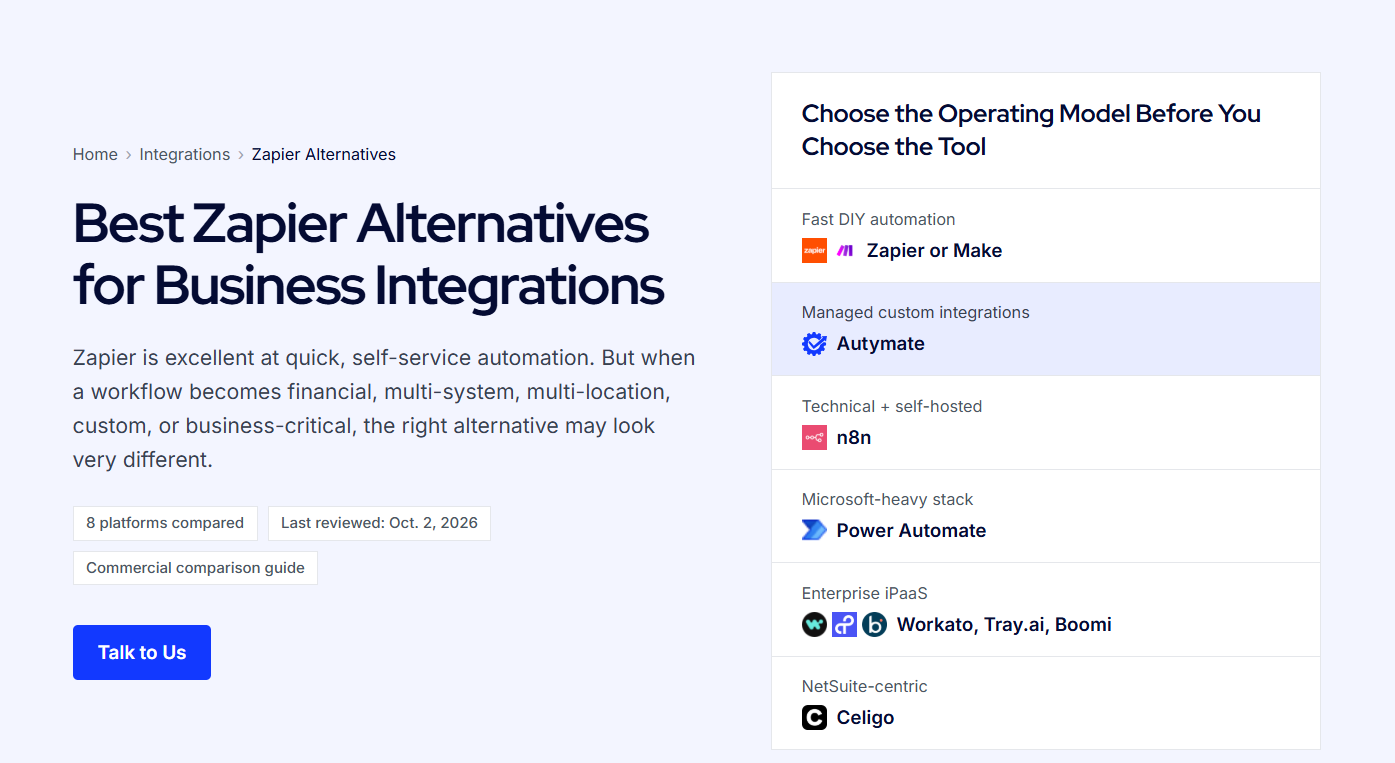
Choosing the Right Zapier Alternative
The right choice depends on what your organization actually needs.
If you need visually configurable workflows, Make may be appropriate.
If your developers want greater deployment and coding flexibility, n8n may make sense.
For enterprise orchestration, Workato is worth evaluating.
For broad enterprise integration architecture, Boomi or MuleSoft may be better aligned.
For ERP and ecommerce automation, Celigo is a strong candidate.
But if you need a team to build, customize, monitor, and maintain the integration for you, Autymate offers a fundamentally different approach.
Autymate's model is built around connecting the systems businesses already depend on and keeping those integrations operational, rather than requiring every company to become its own integration engineering team. Autymate also supports custom API workflows when standard connectors cannot accommodate the required fields, processes, or business rules.
Final Thoughts
Zapier remains a capable automation platform, and its capabilities have expanded significantly beyond simple workflows.
However, not every integration problem should be solved with the same tool.
As businesses scale, automation can evolve from convenient workflow automation into mission-critical infrastructure connecting finance, sales, operations, inventory, payroll, ecommerce, and customer systems.
The best Zapier alternative for complex business automation is therefore the one that matches your level of complexity, technical resources, data volume, governance requirements, and desired level of ownership.
For some companies, that will mean choosing a more advanced self-service automation platform.
For others, the better decision will be using a managed integration partner.
Autymate builds and manages custom integrations across POS, accounting, ERP, CRM, payroll, databases, APIs, and other business systems helping companies automate complex processes while keeping critical data moving reliably.
Need more than a basic automation workflow? Talk to an Autymate integration expert about building an integration around the way your business actually works.