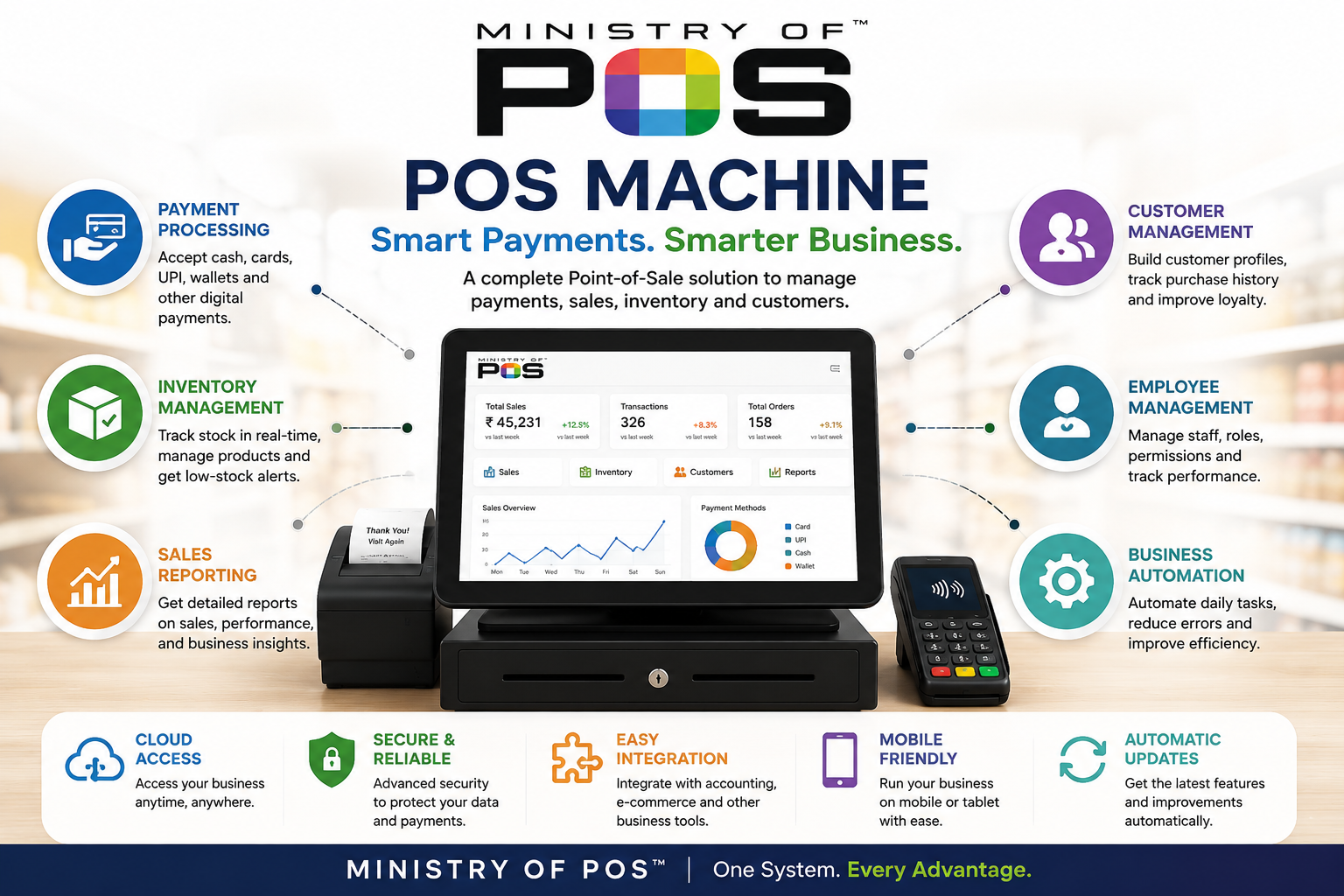
Managing a modern business requires reliable technology for handling payments, sales, inventory, employees, and customers. A point-of-sale system can bring these activities together and help businesses manage their daily operations more efficiently.
A POS machine is an important part of this setup. However, the machine itself is only one part of the overall solution. The software connected to it determines how effectively a business can manage billing, inventory, reporting, and customer information.
For businesses comparing different systems, finding the best POS software means choosing a solution that fits their industry, budget, workflow, and growth plans. Businesses can also consider a mobile POS when they need flexibility to process transactions away from a fixed checkout counter. Modern POS systems increasingly combine portable hardware with software for sales, inventory, and customer management.
What Is a POS Machine?
A POS machine is a point-of-sale device used to complete customer transactions. Depending on the business, a complete POS setup may include a touchscreen terminal, barcode scanner, receipt printer, cash drawer, card reader, and customer display.
When a customer purchases a product, an employee can scan the item or select it from the POS interface. The system calculates the total, applies discounts or taxes, and processes the selected payment method.
After the transaction is completed, the sale is recorded. If inventory management is connected to the system, the stock quantity can also be updated automatically.
Modern POS systems can support various payment options, including cash, cards, QR payments, UPI, and digital wallets, depending on the available payment integrations.
How POS Software Helps Businesses
POS software manages the information and processes behind the POS machine. Instead of using the system only for billing, businesses can use POS software to manage several areas of their operations.
Common capabilities include:
- Sales and billing
- Payment processing
- Inventory management
- Product management
- Customer records
- Employee management
- Sales reporting
- Barcode scanning
- Discount management
- Digital receipts
- Accounting integrations
- E-commerce integrations
A connected system can reduce repetitive manual work and give business owners a clearer view of daily operations.
Choosing the Best POS Software
The best POS software is not necessarily the solution with the largest number of features. It should be the system that provides the functionality a business actually needs.
Retail stores may prioritize inventory and barcode management. Restaurants may need table management, menu management, kitchen communication, and order tracking. Businesses selling both online and offline may require e-commerce integration and synchronized inventory.
Important factors to compare include:
- Ease of use
- Reliability
- Pricing
- Payment options
- Inventory capabilities
- Reporting
- Security
- Hardware compatibility
- Integrations
- Customer support
- Scalability
Businesses should also consider how quickly employees can learn the system. A complicated POS interface can slow down checkout and increase training requirements.
POS Machine for Retail Stores
Retail businesses can use a POS machine to connect products, pricing, sales, and inventory in one system.
When an item is sold, the POS system can record the transaction and update the stock quantity. This allows store owners to monitor inventory levels and identify products that need replenishment.
Retail POS software may also provide tools for:
- Barcode scanning
- Product variations
- Discounts
- Promotions
- Returns
- Exchanges
- Gift cards
- Loyalty programs
For businesses with large product catalogs, automated inventory updates can save time and reduce errors associated with manual stock management.
POS Machine for Restaurants
Restaurants have different requirements from traditional retail stores. A restaurant POS system may include table management, menu management, order tracking, kitchen communication, modifiers, and split payments.
Restaurant employees can enter customer orders through the POS machine and send them to the appropriate preparation area. This can improve communication between service staff and kitchen teams.
A restaurant POS can also provide information about daily sales, popular menu items, payment methods, and employee activity.
Mobile POS for Flexible Transactions
A mobile POS allows businesses to process transactions using portable devices such as smartphones, tablets, or handheld POS terminals.
Mobile POS systems can turn portable devices into checkout points, allowing businesses to accept payments throughout a store, at tables, at events, or at temporary locations.
Restaurants can use mobile POS devices for tableside ordering and payments. Retail employees can assist customers around the store and complete transactions without requiring them to return to a fixed counter.
Mobile POS can also be useful for vendors, service providers, and businesses that regularly operate outside a traditional retail environment.
Benefits of Mobile POS
Faster Customer Service
Employees can process transactions closer to customers, reducing unnecessary movement and potentially shortening queues.
Tableside Ordering
Restaurant staff can take orders directly at tables and send them to the kitchen or preparation area.
Flexible Retail Checkout
Retail employees can assist customers throughout the store and complete purchases from different locations.
Payments at Events
Businesses can accept payments at markets, exhibitions, events, and temporary sales locations.
Improved Customer Experience
A flexible checkout process can reduce waiting time and allow employees to focus more on customer assistance.
Final Thoughts
A modern POS machine can be an important technology investment for businesses that want to improve checkout, payment processing, inventory management, and reporting.
Finding the best POS software requires businesses to look beyond basic billing features and consider their specific operational requirements. Ease of use, inventory management, reporting, security, integrations, hardware compatibility, and scalability can all influence the right choice.
For businesses that need more flexibility, a mobile POS can make it possible to process orders and payments throughout a store, at restaurant tables, at events, or at customer locations.
With the right combination of POS hardware and software, businesses can reduce manual work, improve transaction accuracy, gain better business insights, and create a smoother experience for both employees and customers.